To start the integration, you need to ensure you have the correct settings within your UC100/UC300 for this type of communication.
Requirements:
UC100/UC300
UG65/Milesight Gateway
Connected RS485 Device
USB-C for toolbox configruation.
Connect through the UC100/UC300 through the Milesight Tool Box application, as below.
https://www.milesight.com/support/resources/software-and-platform#milesight-toolbox
The setup for the purpose of this document is as below.
RS485(Modus Master) - Enable
RS485 Bridge- Enabled
Pass thoruhg mode - Active Passthroguh
Port - 2-84 or 86-223 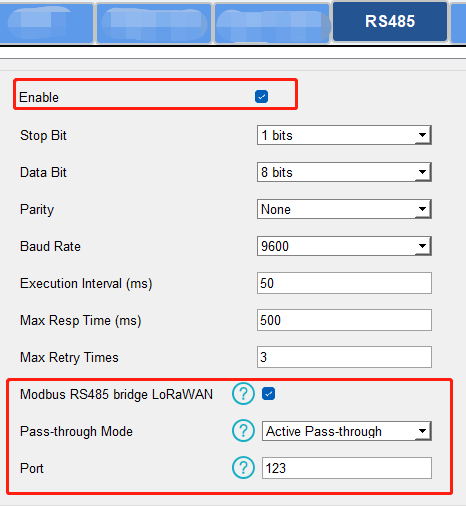
Once you have confirmed the setup of the UC series device, you will then need to confirm you are able to send packets directly to the device.
The process of sending payloads through to your connect RS485 device is done through the packets tab within the Network Server of the UG65.
Here you will input the Device EUI of the UC series device, the data type , the payload you would like to include and the port assigned to the UC series device.
The descritpion of information will be completely dependant on the register details of the connected 485 device and the data you are sending, which is formated as below.
To follow on from this, it is necessary that the UC100 and UC300 have the Modbus transparent transmission / RS485 bridge function available, In this mode, the server sends a complete Modbus RTU frame to the controller, and the controller forwards it to the RS485 device. This can be seen with the above example frame, with a full RTU read command 01 03 00 00 00 01 84 0A. Which is broken down into slave ID, function code, starting address, quantity, and CRC. only UC100 and UC300 support this pass-through mod
Using an example from our ISMA range for digital output register, for register register40018
40018 is the State of Digital Outputs register. It is a 16-bit register where each bit corresponds to a digital output. The documentation maps bit 0 to output 1, bit 1 to output 2, and so on up to bit 11 for output 12.
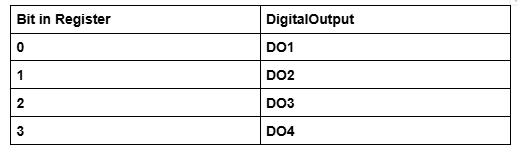
ISMA-B-4U40 Example Payloads
https://drive.google.com/file/d/1biy5P-EXfdLQPImkM9E8K6ecaOgxi_Xo/view?usp=sharing
Now for the HTTP integration.
See attached example of sending a payload to the UC100, through the UG65 gateway to iSMA 4U40 in this case. 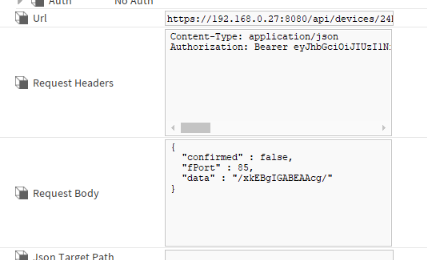
Give the secondary a secondary string a mutliLine facet.
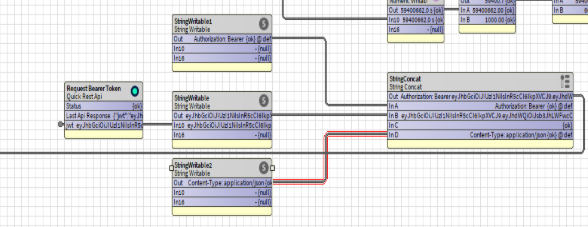
As the bearer token will reset after 24 hours, here is the below logic necessary
Then action the string.
Then press enter.
Your final string will look like this.