
Due to ongoing supply chain challenges, the cost of SD cards has increased significantly.
In addition, SD card availability has become increasingly constrained.
In response, Tridium has decided to modify the JACE 9000 licensing model so that an SD card is no longer required for licensing or operation. The JACE 9000 already has the ability to generate an internal Host ID, which provides the foundation for this change.
SUMMARY
• JACE 9000 controllers will be able to operate without an SD card.
• Licensing will use the controller's internal Host ID.
• Both SD card and non-SD card solutions will be supported during the transition period.
• Existing SD card inventory can continue to be used.
• Hardware shipments for orders accepted by Tridium after September 18, 2026 will not include an SD card.
FAQ
Can I license a JACE 9000 I already have without using the SD?
Yes, all JACE 9000s will be able to be licensed with or without an SD card.
How will I know what the onboard hostid is for an unlicensed JACE 9000?
There are two main ways of finding out what the onboard hostid is for a JACE 9000: on the JACE or in Niagara Licensing.
On the JACE, you can power it up and will be able to see the onboard hostid in the Platform details or you can use the debug port.
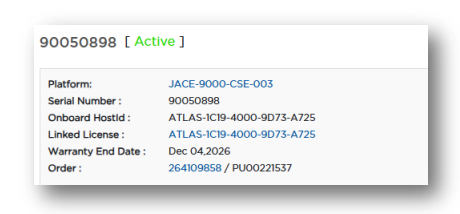
In Niagara Licensing, if you search by the JACE 9000 serial number, you will see the details of the device with onboard hostid (see illustration below). This is also where you can see how the JACE 9000 was licensed, either with an SD card hostid, or with the onboard hostid.
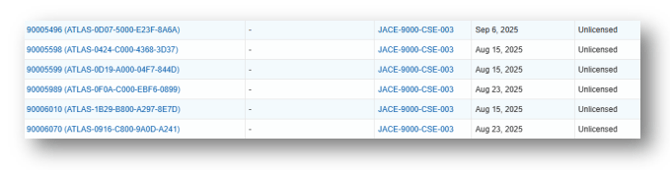
Also, in your License Project Folders you can see a list of all JACEs in those in the HardwareBoards tab. You’ll see the onboard hostids in parentheses after the serial numbers.
How can I tell if my JACE is licensed with an SD card or onboard hostid?
You can tell by the hostid prefix: ATLAS indicates onboard hostid while ATLAS-SD indicates SD Card hostid. You will also be able to compare the license hostid with the onboard hostid.
Can I continue to use the SD cards that I have?
Yes, you can continue to use the SD cards you have on hand, the JACE will continue to work with and without an SD card.
Are there any benefits to not using an SD card for licensing?
The primary benefit is cost efficiency. Removing the SD Card reduces the overall list price of a deployed JACE 9000 by eliminating the cost of the SD card and the additional surcharges introduced in response to recent SD card price increases.
How will I be able to move a license from one JACE 9000 to another?
If you have licensed your JACE using the onboard hostid, you will need to use Niagara Licensing to transfer the license to the replacement JACE 9000, instead of physically moving an SD card.
Self-serve license transfers are not yet available in Niagara Licensing. We have prioritized enabling the new licensing model first and some RMA and license transfer processes may be paused for a short period of time. We expect to enable self-serve license transfers during Q1 2027. In the interim, please contact your direct partner for assistance with license transfers or hardware replacements.
Will I be able to remove an SD card from a JACE and now use the onboard hostid instead?
Self-serve migration from SD card to onboard hostid is not yet available. We have prioritized enabling the new licensing model first and expect to enable this new capability during Q1 2027. In the interim, please contact your direct partner for assistance.
If I’ve licensed a JACE without an SD card will I be able to use an SD card at a later date?
Self-serve migration from onboard hostid to SD card is not yet available. We have prioritized enabling the new licensing model first and expect to enable this new capability during Q1 2027. In the interim, please contact your direct partner for assistance.
How will I know what to order?
Licensing is the same as before and all Licensing Models remain the same. The only exception will be for customers who purchase ‘bundled’ individual JACE 9000s (i.e. including JACE, clip and SD card) in a single SKU along with software. There will be new part numbers and new pricing (excluding the SD cards) and these new SKUs will be issued to you by your Sales Representative.
So, I no longer need to purchase an SD card to make the JACE 9000 functional?
Yes, the JACE 9000 will no longer require an SD card, it will generate its hostId for licensing purposes internally.
The JACE 9000 saves nightly encrypted backup DIST files to the microSD card. How can backups be maintained without a microSD card?
If a microSD card is not installed, backups can still be maintained using several alternative methods:
• Configure the Station Auto Save Versions to Keep setting in Platform Services to 3 instead of the default value of 0. When the station is saved to onboard flash storage, Niagara automatically maintains three rolling backup copies of the config.bog file.
• If the Niagara architecture includes a Supervisor, configure Provisioning on the Supervisor to automatically back up JACE stations to the Supervisor's protected station home directory. • Niagara Workbench can be used to manually back up a JACE 9000 by navigating to Platform > Platform Administration and selecting Backup.
• Consider using Niagara Recover to create encrypted cloud backups of the station for secure offsite storage and recovery.
These options provide local backup retention, centralized backup management through a Supervisor, manual backup capabilities through Workbench, and secure offsite protection with Niagara Recover.
Any further questions please just get in touch with us: Support